
How do I reconcile GSTR-2B?
In Reconciliation, choose New reconciliation, fill in the client, GSTIN and period, and upload the portal's GSTR-2B JSON or Excel export. Nothing is filed and the portal is never touched.
Updated 29 Sept 2026
Steps
- Step 1: Open Reconciliation and choose New reconciliation.
- Step 2: Pick the Client and the GSTIN on the return.
- Step 3: Enter the Period (MMYYYY), for example the month and year of the return with no space.
- Step 4: Under Reconciliation, keep GSTR-2B and purchases, or choose the e-invoice or e-way bill reconciliation (see the sections below).
- Step 5: Under Source, choose GSTR-2B JSON, GSTR-2A JSON or Excel export.
- Step 6: Drop the file in and choose Reconcile this file.
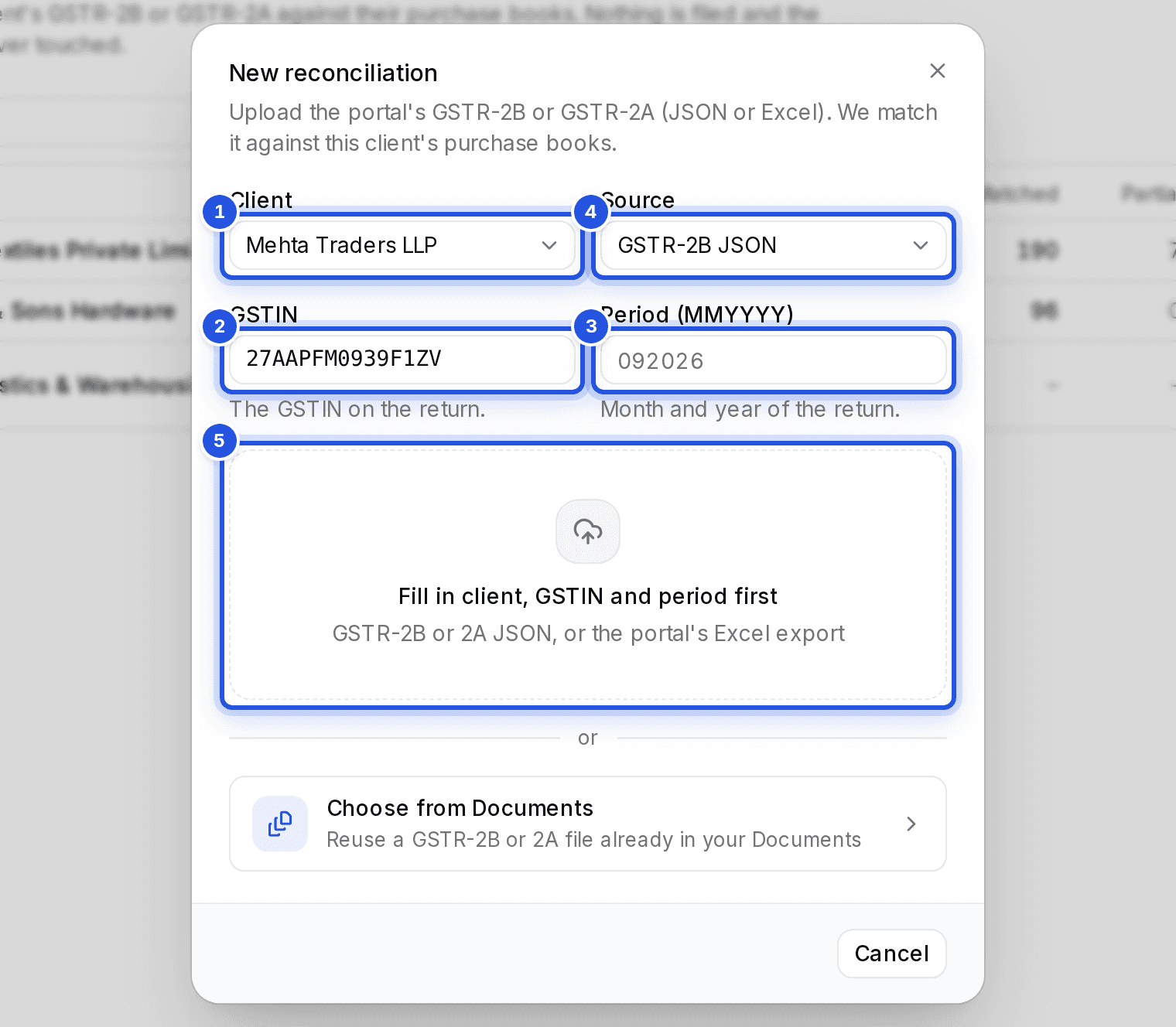
Matching runs in the background and the page updates on its own.
E-invoice and sales
Upload the e-invoice register from the IRP portal, as Excel or JSON. Lines are paired by the buyer's GSTIN and document number. The reasons are Matched, No IRN on the register, IRN cancelled, still in books, Value differs, Date differs, In books, not on the IRP, On the IRP, not in books and Duplicate.
E-way bill and sales
Upload the e-way bill portal's report of bills you generated, or the one generated by others. Lines are paired by the consignee's GSTIN and document number. The reasons are Matched, E-way bill cancelled, E-way bill rejected, Generated by the other party, Month differs, Value differs, Invoice without an e-way bill, E-way bill without an invoice and Duplicate.
Add the GSTR-3B file (optional) to see a month-by-month table: the e-way bill total, the GSTR-3B outward supply total, the difference, and the lines that help explain it. Invoices under ₹50,000 with no e-way bill are not listed, because none is required below that value.
Export to Excel
On a finished run, choose Export to Excel. The workbook has a summary, one sheet for each reason and, for e-way bills, the monthly table. Differences are formulas, so the working can be read and cited in a reply.
Files up to 100 MB are accepted. A very large file takes a few minutes; you can leave the page while it runs.
Was this helpful?
Still stuck? Write to support and we will get back to you. Contact support