
9 Types of Vouchers in Tally: Entries and Ledger Postings
Learn the types of vouchers used in CA and TallyPrime work, from receipt and payment to credit notes, with ledger postings and examples.
Published 18 min read

You're closing a client's books, and the bank statement shows a credit nobody can explain. The accountant has entered the amount, the trial balance agrees, and the customer still appears overdue. Open the voucher, and the problem becomes clearer: someone credited sales instead of adjusting the customer's outstanding invoice.
That's why choosing between the types of vouchers in TallyPrime isn't just a data-entry decision. You need the right debit and credit, but you also need the correct bill allocation, bank reference, inventory treatment and GST classification. A balanced entry can still leave the books wrong.
The practical starting point is the transaction itself. A customer collection isn't another sale. A transfer between the client's own bank accounts isn't income. A purchase return voucher isn't automatically the same document as a supplier's GST debit note.
Posting principle: Identify what happened before deciding which voucher screen to open.
For each entry, establish whether cash or bank moved, whether you're recognising a transaction or settling an existing balance, and whether tax or inventory needs adjustment. Then select the voucher and check its effect on the party ledger, bank reconciliation and GST reports.
The voucher types below cover routine payments and receipts, commercial transactions, adjustments and temporary reporting entries. The postings describe the accounting effect; the exact ledger names and entry screens depend on the client's TallyPrime configuration.
Table of Contents
- 1. Payment Voucher
- Separate settlement from expense recognition
- 2. Receipt Voucher
- Classify the credit before allocating it
- 3. Contra Voucher
- Reconcile both sides of the transfer
- 4. Journal Voucher
- Make the calculation reviewable
- 5. Sales Voucher
- Match the invoice and tax classification
- 6. Purchase Voucher
- Book the liability without assuming credit eligibility
- 7. Debit Note
- Distinguish the accounting entry from the GST document
- 8. Credit Note
- Separate commercial relief from tax relief
- 9. Reversing Journal Voucher
- Use temporary reporting entries deliberately
- Accounting voucher types at a glance
- Pick the Right Voucher Before You Post Anything
- Ask what actually changed
- Review beyond the trial balance
1. Payment Voucher
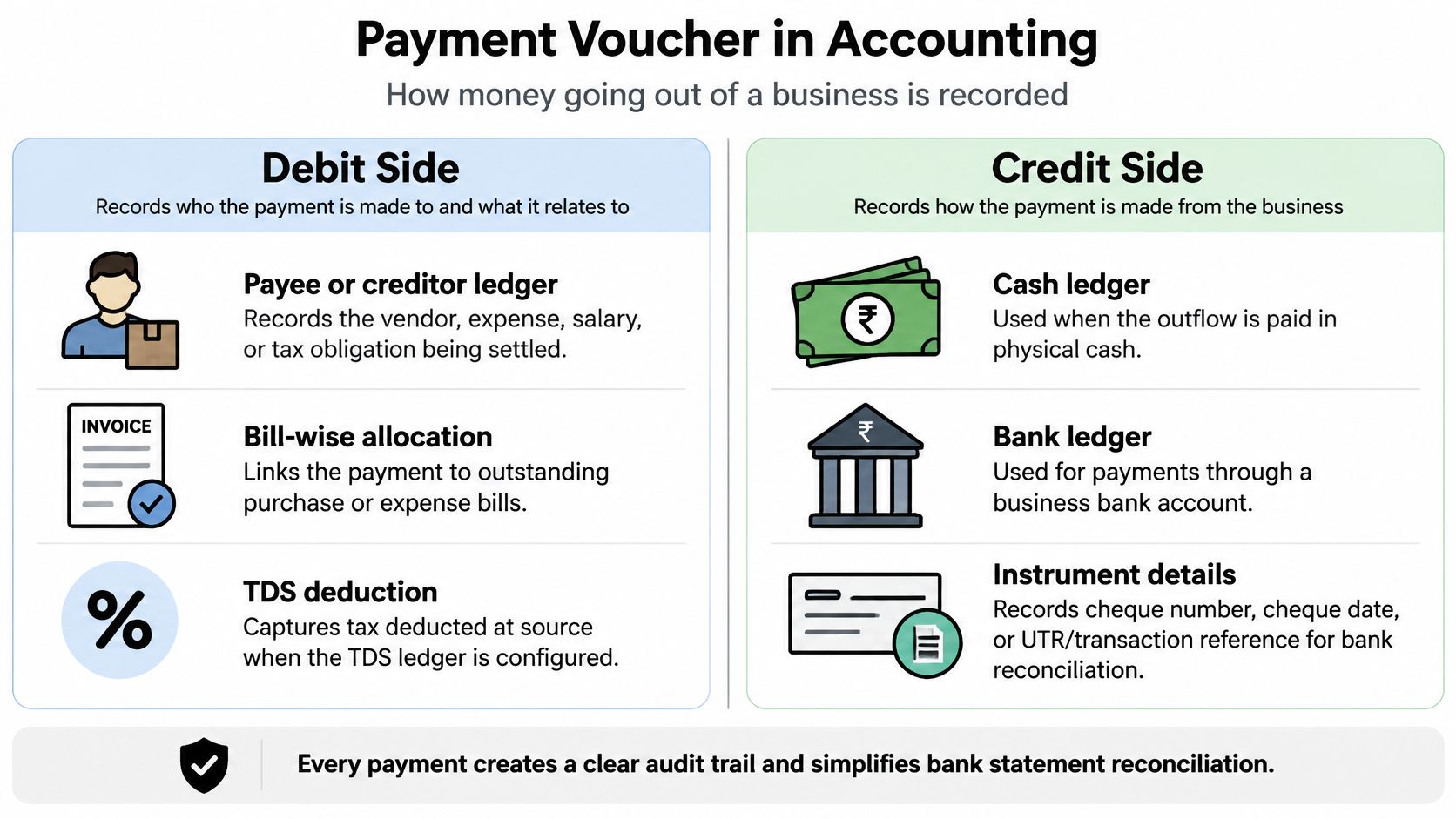
A Payment Voucher records money leaving the business through cash or bank. Use it to settle a supplier, pay salaries, discharge a tax liability or record an expense paid directly.
For a vendor invoice already recorded through a Purchase Voucher, the payment entry is:
- Debit: Supplier ledger, allocated against the outstanding bill.
- Credit: Bank ledger, for the amount transferred.
Don't debit purchases again. Doing that duplicates the expense while leaving the original creditor unpaid in the books.
Separate settlement from expense recognition
Say a client pays a supplier by NEFT. Select the supplier ledger, adjust the relevant bill reference, credit the correct bank and retain the UTR in the banking details or narration. For salaries already accrued, debit Salary Payable, not Salary Expense.
Where TDS applies and hasn't already been recognised, the entry may debit the supplier's gross settlement amount and credit both Bank and TDS Payable. Check the earlier invoice posting before deducting again.
The NACO financial-management guidelines require payment vouchers before cheque issuance within their prescribed framework, supported by documentary evidence and serial numbering.
For practice-wide control, insist on the invoice, approval and payment reference. Correct bill allocation matters as much as the bank credit: an unallocated payment can reconcile with the statement while leaving creditor ageing misleading.
2. Receipt Voucher
A customer pays outstanding invoices through NEFT. The bank credit is real, but the business has already recognised the sale. The Receipt Voucher should clear the receivable, not create fresh turnover.
The posting is Debit Bank, Credit Customer. In TallyPrime's bill-wise allocation, adjust the receipt against the invoices the customer has settled.

Classify the credit before allocating it
A bank credit could instead be a customer advance, supplier refund, loan receipt or capital introduction. Each requires a different credit ledger, even though Bank is debited in every case.
For an advance, debit Bank and credit the customer with an advance reference, or the designated Customer Advances liability ledger under the client's accounting policy. Don't recognise revenue merely because money arrived. Review the applicable GST treatment separately.
- Customer collection: Adjust the identified outstanding invoices.
- Supplier refund: Credit the supplier account or relevant recoverable balance.
- Unidentified receipt: Use a controlled clearing ledger pending investigation, rather than guessing the customer.
- Net settlement: Investigate deductions for TDS, charges or credit notes before closing the bill.
A common mismatch arises when the accountant posts the net bank receipt against the full invoice without recognising the deduction. The customer then appears partly overdue.
Review unapplied receipts alongside debtor ageing at month-end. Match the payer, bank reference and remittance advice, not just the amount. Similar-sized receipts from different customers aren't interchangeable.
3. Contra Voucher
Moving money within the same business isn't revenue or expenditure. A Contra Voucher records transfers between its cash and bank ledgers or between its own bank accounts.
For office cash deposited into the current account, post Debit Current Account, Credit Cash. For cash withdrawn from the bank, reverse the direction: Debit Cash, Credit Bank.

A transfer between business bank accounts debits the receiving bank and credits the sending bank. Neither side belongs in the profit and loss account.
Reconcile both sides of the transfer
Tally's accounting-voucher guidance distinguishes contra transactions from receipts, payments and non-cash adjustments. The operational benefit is clear: reviewers can identify internal fund movements without confusing them with business collections.
Say the sending bank shows a debit before the receiving bank shows the credit. Preserve the transaction date and reconcile the statement dates separately. Don't change the books merely to force both statements to agree on the same date.
Use the bank reconciliation tool to investigate unmatched entries, then trace each transfer to the opposite account.
An internal transfer needs an identifiable other side. If you can't find it, investigate before calling it a contra.
Record bank charges separately as an expense. Also confirm ownership: money transferred to a proprietor's personal account may be drawings, not a contra between business assets. Choosing Contra because both documents are bank statements can conceal the actual transaction.
4. Journal Voucher
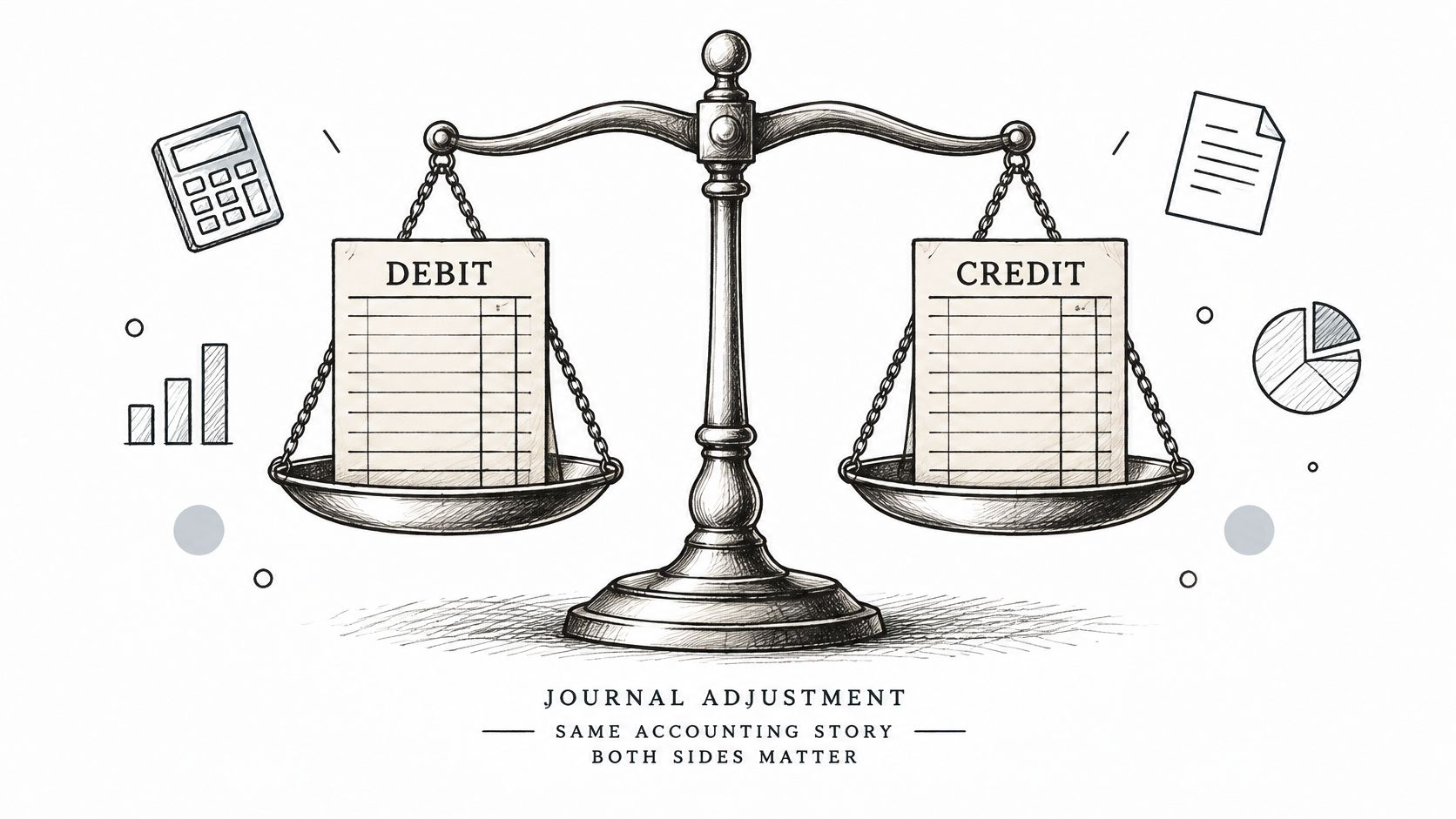
A Journal Voucher records non-cash adjustments such as depreciation, accruals, provisions and reclassifications. It's useful precisely because it's flexible, but that flexibility makes poor postings harder to spot.
For depreciation, post Debit Depreciation Expense, Credit Accumulated Depreciation, where the client maintains a separate accumulated depreciation ledger. Under a direct write-down policy, the credit goes to the relevant fixed asset ledger instead.
Make the calculation reviewable
For an unpaid professional fee accrued at closing, debit Professional Fees and credit Accrued Expenses. When the invoice arrives, clear the accrual through the appropriate posting rather than charging the expense again.
A provision for doubtful debts would normally debit the provision expense and credit an allowance ledger. It doesn't automatically clear the customer's invoice; a provision and an approved write-off are different decisions.
- Attach the basis: Retain the asset schedule, accrual calculation or approved adjustment note.
- Explain the purpose: State what period and balance the journal corrects.
- Identify follow-up: Specify whether the entry needs reversal, settlement or later reassessment.
Avoid using journals as a shortcut for routine bank transactions or GST invoices. Although the debit and credit may balance, you can lose banking details, bill references or transaction-specific reporting.
Review journal-ledger effects before using a trial balance to balance sheet tool. A correctly grouped trial balance won't reveal that an unsupported provision or duplicated accrual should never have been posted.
5. Sales Voucher
A Sales Voucher recognises the supply, the customer's liability and applicable output tax. Collecting the money later is a separate receipt transaction.
For a taxable intrastate credit sale, the posting is:
- Debit: Customer, for the invoice total.
- Credit: Sales, for the taxable value.
- Credit: Output CGST and Output SGST, for the applicable tax.
For an interstate taxable supply attracting IGST, credit Output IGST instead of the split tax ledgers. Don't assume every export follows that same treatment; establish the applicable export arrangement before posting.
Match the invoice and tax classification
Check the customer GSTIN, place of supply, item classification, tax treatment and invoice number. In item-invoice mode, also verify the stock item, quantity and unit, because a sales entry can affect inventory as well as revenue.
The official IRP FAQ identifies invoices, credit notes and debit notes among the documents covered by e-invoicing for qualifying transactions. Where applicable, retain the IRN and QR-code evidence with the corresponding accounting document.
The walkthrough below provides a visual reference for voucher entry.
A balanced sales entry can still produce a GST mismatch if the accountant selects the wrong registration, supply category or tax ledger. Compare the sales register with outward-supply reporting and applicable e-invoice records before filing.
Don't post the same invoice again when importing another register. Match document identifiers first. Duplicate imports inflate turnover, output tax and receivables together, so the trial balance can remain perfectly balanced.
6. Purchase Voucher
The supplier invoice belongs in a Purchase Voucher, even if payment will happen later. This records the purchase, expense or asset and creates the supplier liability.
For a credit purchase with eligible input tax, debit the appropriate Purchase, Expense or Fixed Asset ledger, debit the applicable Input GST ledgers, and credit the Supplier for the gross invoice amount. For an eligible interstate purchase, the input-tax debit will ordinarily be to Input IGST.
Book the liability without assuming credit eligibility
Say a manufacturer receives raw materials with a supplier invoice. Enter the stock item and quantity, verify the supplier details, and allocate the invoice reference to the creditor. The later bank payment should clear that reference through a Payment Voucher.
Recording input tax isn't the same as establishing entitlement to claim it. Review the invoice, receipt of goods or services, applicable restrictions and return reconciliation before including credit in the claim.
- Invoice identity: Preserve the supplier's invoice number and GSTIN accurately.
- GSTR-2B matching: Investigate invoices missing from the statement or showing value differences.
- Blocked or ineligible tax: Charge it to the appropriate expense or asset cost under the applicable accounting treatment.
- Capital purchases: Debit the asset ledger rather than routine purchases where capitalisation is appropriate.
An invoice appearing in GSTR-2B isn't, by itself, proof that every substantive condition is satisfied. Conversely, a reconciliation issue doesn't justify omitting a genuine supplier liability from the books.
Keep the accounting recognition decision separate from the ITC claim decision. That separation prevents missing creditors, overstated credit and unexplained differences between the purchase register and GST workings.
7. Debit Note
The name Debit Note needs care because the buyer's accounting voucher and the supplier's GST document can serve different purposes. In a purchase-return workflow, the buyer debits the supplier to reduce the payable.
For goods returned against an unpaid purchase invoice, the buyer's entry will generally be Debit Supplier, Credit Purchase Returns or Purchases, with an appropriate credit to Input GST where reversal is required. In item mode, check that the returned quantity also leaves stock.
Distinguish the accounting entry from the GST document
Say a supplier accepts defective materials back. Record the return against the original purchase reference, retain dispatch evidence and obtain the supplier's acknowledgement or credit note.
The legal distinction is that a supplier's GST debit note increases an understated taxable value or tax, while a supplier's credit note may support a qualifying reduction. Review the credit and debit note provisions under the CGST Act before deciding which tax document the transaction requires.
Document caution: A buyer's purchase-return debit note doesn't automatically reduce the supplier's output GST.
If the supplier issues a debit note for an undercharged purchase instead, the buyer's accounting direction is different: debit the relevant purchase or expense and eligible input tax, then credit the supplier.
Link every adjustment to its commercial reason and underlying invoice. Don't let the voucher name determine the tax treatment.
Reconcile the adjustment with the supplier ledger and relevant GST records. Otherwise, the buyer may reduce the payable while the supplier continues showing the original amount due, leaving both the balance confirmation and tax reconciliation unresolved.
8. Credit Note
A customer returns goods after a sale. A receipt entry won't correct the turnover, and a payment entry alone won't correct the receivable. The seller normally needs a Credit Note.
For a qualifying sales return with a permitted GST reduction, post Debit Sales Returns or Sales, debit the relevant Output GST ledgers, and Credit Customer for the total adjustment. If inventory is maintained, enter the returned items and verify that their condition supports putting them back into saleable stock.
Separate commercial relief from tax relief
A commercial credit note doesn't always permit an output-tax reduction. For a price concession that doesn't qualify for GST adjustment, debit the relevant sales-adjustment or discount ledger and credit the customer without automatically debiting Output GST.
This distinction matters for post-sale discounts. The commercial team may approve the concession, but the accounts team must independently assess the tax conditions and reporting treatment.
- Original transaction: Reference the invoice and explain the return, overcharge or agreed concession.
- Tax adjustment: Confirm that the conditions and applicable reporting timeline permit the reduction.
- Customer balance: Allocate the credit against the relevant bill rather than leaving it unapplied.
- Refund: If money is returned afterwards, record that outflow separately through a Payment Voucher.
A frequent error is to record the credit note correctly in the ledger but omit or misclassify it in outward-supply reporting. Another is to refund the customer without recording the underlying sales adjustment.
Review the credit note, inventory return and refund together. Each records a different part of the same commercial event.
9. Reversing Journal Voucher
An estimated electricity bill can affect a management report without becoming a permanent entry in the regular books. In TallyPrime, a Reversing Journal has an effect in scenario reports only for its specified validity period, then reverses in the following period.
Use temporary reporting entries deliberately
Suppose the electricity invoice has not arrived, but management needs a provisional profitability statement. The temporary entry is Debit Electricity Expense, Credit Accrued Electricity Payable. Set the applicable period and include the voucher in the relevant scenario report. Check the report settings before relying on the adjustment.
For an accrual that belongs in the actual closing books, use a regular Journal Voucher and manage its later reversal or settlement explicitly. When the supplier invoice arrives, clear the accrual and record any difference. Do not charge the full expense again.
- Reporting purpose: Decide whether the estimate belongs only in a scenario or in the actual accounts.
- Validity: Set the temporary voucher's applicable period deliberately.
- Actual invoice: Record it through the appropriate transaction voucher.
- Prepayments: Maintain a release schedule rather than assuming a temporary voucher recognises expense over the coverage period.
A temporary reporting adjustment and a booked liability serve different purposes. The main risk is a management report that includes an accrual while the statutory closing books exclude it, or an assumed reversal that has not been checked in the ledger.
Accounting voucher types at a glance
The voucher determines which ledgers TallyPrime updates and what appears in reconciliation. Check the debit and credit before posting: a wrong voucher can duplicate income, leave a supplier balance open, or misstate GST.
| Item | Primary Use | Typical Ledger Posting | GST Link |
|---|---|---|---|
| Payment Voucher | Record money paid by cash or bank | Debit the payee, expense, or liability; credit Cash or Bank | Usually no direct GST link; may record TDS or tax payments |
| Receipt Voucher | Record money received by cash or bank | Debit Cash or Bank; credit the customer or income ledger | Usually no direct GST link; may record customer advances |
| Contra Voucher | Record transfers between cash and bank accounts | Debit one Cash or Bank ledger; credit another | No direct GST link |
| Journal Voucher | Record non-cash adjustments and corrections | Debit and credit applicable ledgers; totals must balance | Usually no direct GST link for adjustment entries |
| Sales Voucher | Record sales of goods or services | Debit the customer or Cash/Bank; credit sales and output GST ledgers | Records output GST and feeds GSTR-1 |
| Purchase Voucher | Record purchases of goods or services | Debit purchases and eligible input GST; credit the supplier or Cash/Bank | Records input tax credit for matching with GSTR-2B |
| Debit Note | Reduce the amount payable to a supplier | Debit the supplier; credit purchases, expenses, or input GST adjustments | May adjust input tax credit under Section 34 |
| Credit Note | Reduce the amount receivable from a customer | Debit sales returns or output GST adjustments; credit the customer | May reduce output tax when reported in GSTR-1 under Section 34 |
| Reversing Journal Voucher | Record temporary reporting adjustments within a set validity period | Debit and credit applicable ledgers; applies only within the configured scenario report, not the ordinary books | Usually no direct GST link; actual invoice determines GST treatment |
Pick the Right Voucher Before You Post Anything
Choosing the correct voucher is a low-cost control over bookkeeping quality. It determines which ledgers move, how outstanding bills are adjusted, whether inventory changes and what information reaches the GST reconciliation.
Start with the transaction, not the screen you used last time. A bank debit might settle a supplier, create a deposit, withdraw cash or repay a loan. The same direction of money movement doesn't imply the same accounting treatment.
Ask what actually changed
Before approving an entry, work through these questions:
- Did cash or bank move? Identify whether the movement is external or between the business's own accounts.
- Was the transaction already recognised? Settle the existing receivable or payable instead of booking income or expenditure again.
- Does profit change? Separate expenses and revenue from assets, liabilities and internal transfers.
- Does GST need recognition or adjustment? Establish the tax treatment independently of the voucher label.
- Does stock move? Ensure the inventory record agrees with the commercial document.
Then inspect the supporting evidence. A bank statement proves a movement of money, not necessarily its business purpose. An invoice supports a charge, but doesn't establish payment or settle every question about ITC eligibility.
The same discipline applies to commercial gift vouchers and digital instruments. An accounting voucher is a bookkeeping record, not automatically the same thing as a redeemable instrument sold to a customer. Don't let the shared word substitute for analysing the underlying transaction.
Review beyond the trial balance
A balanced voucher proves that debits equal credits. It doesn't prove that the party, tax ledger, bill reference, stock item or reporting period is correct.
Review bank reconciliation, debtor and creditor ageing, inventory movements and GST exceptions alongside the trial balance. Pay particular attention to journals, clearing accounts, unapplied receipts and adjustments without original invoice references.
Charter AI can ingest bank statements and invoices, suggest ledgers, prepare vouchers for review and export approved entries to TallyPrime. Its pre-posting checks include voucher balance, statement matching, GSTIN checksum, exact party matching and duplicate detection; Charter AI estimates that it saves 3 hours per bank statement converted to vouchers.
Automation works best when the firm first defines approved voucher mappings and review responsibilities. Keep judgement with the reviewer, especially for ambiguous bank descriptions, tax adjustments and temporary closing entries. Resolve the exception before posting, rather than leaving another accountant to explain it at the next month-end.
Charter AI offers bank statement and invoice ingestion, voucher preparation, GST reconciliation and approved voucher export to TallyPrime. Visit Charter AI to review how these workflows can help your team select ledgers, check entries and resolve exceptions before posting.